


Cupixel: Make art with a twist
3.486.00 Reviews
App Specs
- Version
- 10.15.3
- Updated On
- License
- Free
- Downloads
- 100,000+
- Developer
- Cupixel Inc.
- Categories
- Art & Design
- Platform
- Android
Screenshots
 Analysis by AppCompare
I approach Cupixel: Make art with a twist as a beginner-friendly art app rather than a replacement for a sketchbook or a full digital drawing studio. Its central appeal is the guided route from an image or lesson to a finished piece: it gives you a starting point when a blank page feels daunting, while still leaving room to make choices as you work. That can make the first attempt feel less like a test of drawing skill and more like an invitation to try.
What to expect from the guided approach
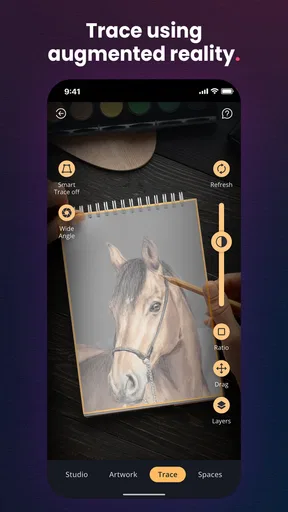
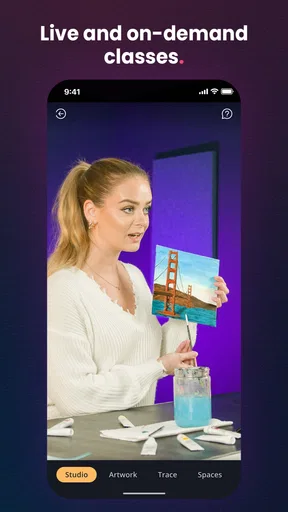
Cupixel is an art and design app from Cupixel Inc. Its tools are built around learning by doing: you can work with templates and tutorials, and the app’s augmented-reality guidance is intended to help you follow a design on a real canvas. In that sense, it sits between a conventional painting tutorial and a freeform drawing app. You get a route to follow, but the satisfying part is still making the image yourself.
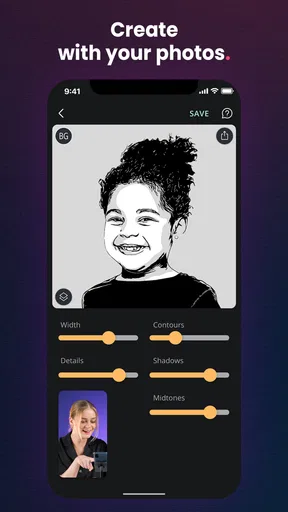
The photo-to-template workflow is especially appealing if you have an idea but no confidence about drawing it from scratch. A familiar subject can make a first project feel personal: a pet, a favorite object, or a small scene from your day gives you something concrete to paint. I’d think of the template as a scaffold, not a promise that every photo will become an equally clear or easy project. Choosing a simple subject with distinct shapes is a sensible way to give yourself a smoother first go.
It is free to install, though in-app purchases range from $7.99 to $99.99 per item, so I would explore the available experience before spending money. Cupixel has a 3.3 average from 327 ratings, alongside 86 written reviews, and has reached over 100K installs. Those figures suggest a real audience, but they are also a reminder that an app built around personal creative habits will not click equally for everyone. It is rated for Everyone, was released on July 10, 2019, and the current version is 10.14.7; Android users need version 8.0 or later.
From installation to a first finished piece
For a first session, I would keep the goal modest: get into the app, choose one approachable tutorial or template, and finish a small section instead of browsing every option. If you want to use your own photo, pick an image with a clear subject and uncluttered background. That makes it easier to understand what the guide is asking you to trace or paint, and it reduces the chance that a complicated reference will turn your first attempt into a frustrating exercise.
The AR-guided method also works best when you treat setup as part of the activity rather than something to rush through. Set your canvas and device somewhere stable, make sure the design is easy to see, and check that you can work comfortably before you begin. I would not start with a precious canvas or a project you need to finish quickly. A scrap surface or a low-pressure practice attempt gives you room to adjust if the overlay or your positioning feels unfamiliar.
Where the app helps—and where it may not
The main strength is lowering the barrier to starting. A traditional art class can offer richer personal feedback, while a standard drawing app usually gives you more freedom and direct control over brushes and layers. Cupixel’s guided, physical-canvas angle is a better fit when you want help translating a design into a hands-on activity. If your priority is detailed digital illustration, advanced editing, or complete control over every mark, a dedicated drawing app is likely the better tool.
Worth Reading Before You Choose

EA SPORTS FC Mobile 26 Is a Bigger Football Game, but It Takes Time

Flipboard Shows What News Apps Must Do Beyond the Feed

Switching to Android Auto Means Rethinking Your Driving Routine

Google Calendar Makes a Crowded Week Easier to Manage

Ludo King Makes the Most of the Minutes Between Plans

Baby Panda World Brings Quick Play to Modern Phones, but Its Game Library Feels Busy
There is a trade-off in relying on guidance: following a template can make a project approachable, but it can also make the process feel more structured than spontaneous painting. I’d use the guide to get past the intimidating first marks, then make deliberate choices of my own—such as changing colors, adding a small detail, or leaving part of the design looser. That balance lets the tutorial teach without making the result feel like a mechanical copy.
It may also help to separate the app’s different kinds of value. Tutorials can show you a process; templates can supply a subject; AR can help you place a design on a physical surface. Those solve different problems, and you do not need to use all of them in every session. If you already have a subject in mind, start with the photo route. If you mainly want to learn a technique, begin with a lesson instead of spending time searching for the perfect image.
A low-pressure routine that makes sense
Imagine you have a quiet half-hour after dinner and want to do something more absorbing than scrolling. You could choose a simple photo of a houseplant, set up a modest painting surface, and follow the guide in stages. The useful part is not producing a gallery-ready picture in one sitting; it is having a clear next action when you are unsure what to draw. If you stop midway, you can return to the same project when you have time rather than needing to invent a new idea from scratch.
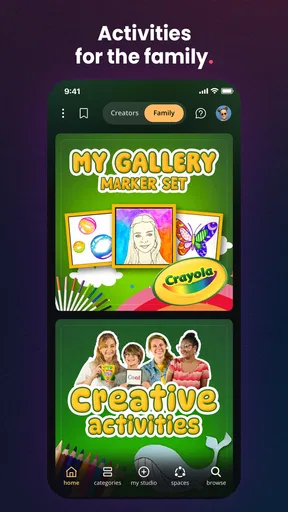
For families or friends, a shared session can turn the templates into a starting point for different interpretations. Each person can work from the same kind of reference but choose their own colors or small additions. I would keep expectations relaxed, especially with younger or less patient participants: the app is rated for Everyone, but a guided art activity still asks for some attention and setup. It is better suited to a calm creative moment than to something you expect to entertain a group without preparation.
One practical tip is to make a small test before committing to the final surface. Check whether the template is visible where you plan to work and whether your chosen materials suit the task. This is a useful precaution with any physical-art workflow, and it matters here because the app’s guidance is only helpful if the design is legible and comfortable to follow. A second tip is to choose a reference with a strong outline before trying a busy photo; complexity can be rewarding later, but it is rarely the kindest way to learn a new process.
Getting Started with Cupixel
First things first, setting up the app is a breeze. You download it, create an account, and boom, you’re ready to start painting the town red—or any color you fancy. The app is available on both Android and iOS, so no one gets left out of the creativity party.
One of the coolest features is how Cupixel transforms your photos into paint-by-number templates. Seriously, you can snap a picture of your dog, your coffee mug, or even that cool graffiti down the street, and the app turns it into a canvas ready for your artistic touch. It’s like having a personal art assistant right in your pocket.
Features That Spark Joy
What makes Cupixel truly unique is its use of augmented reality. Yes, you heard me right—AR for art. The app guides you step-by-step through the painting process, projecting the template onto a real canvas. It’s like having a modern-day Bob Ross whispering happy little instructions in your ear.
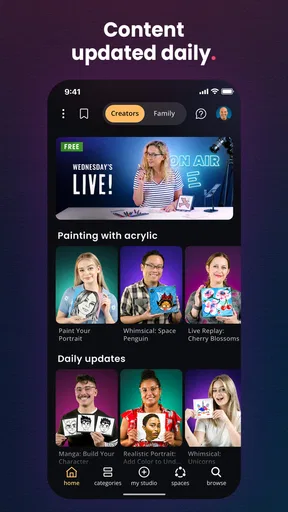
Another feature that caught my eye is the extensive library of templates and tutorials. Whether you’re into landscapes, abstracts, or quirky illustrations, there's something for everyone. Plus, the tutorials are super easy to follow, even if you’re like me and can barely draw a stick figure.
"Art is not what you see, but what you make others see." – Edgar Degas
This quote perfectly encapsulates the spirit of Cupixel. The app is all about making art accessible and fun, allowing users to express themselves without fear of judgment or the pressure of perfection.
The User Experience
Navigating through the app is a breeze. The interface is clean and intuitive, with everything you need just a tap away. You don’t need a degree in tech to figure it out, which is always a win in my book.
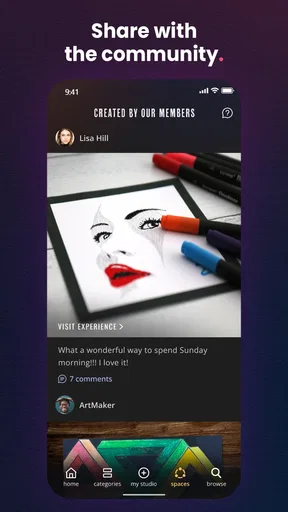
Now, let’s talk about community. Cupixel has a vibrant community of artists and art lovers. You can share your creations, get feedback, and even join art challenges. It’s a supportive space where everyone cheers each other on, making the creative process even more enjoyable.
Why You Should Try Cupixel
So, why should you give Cupixel a shot? Well, if you’re looking to explore your creative side without the hassle of traditional art classes, this app is the way to go. It’s perfect for unwinding after a long day, trying something new, or even impressing friends with your newfound skills.
In a world that often feels fast-paced and chaotic, taking the time to create something beautiful can be a much-needed escape. Cupixel makes that possible in a fun and accessible way, turning even the most hesitant beginner into a confident creator.
So go ahead, download Cupixel and let your creativity run wild. Who knows, you might just discover a hidden talent you never knew you had. Happy painting!
Choosing whether to stick with it
I’d recommend it most to someone who wants a friendly prompt to begin making physical art, especially if tracing and step-by-step direction feel reassuring rather than restrictive. It is also a reasonable choice for a parent, a casual hobbyist, or a person looking for a hands-on activity to share, provided they are happy to prepare a surface and work at a measured pace. The app’s guided format is the point, not a limitation to overcome.
I would steer away if you mainly want a blank digital canvas, a professional illustration workflow, or lessons built around detailed critique from a teacher. Those needs call for different tools. I would also avoid paying for anything until you have tried enough of the free experience to know that the tutorial style and physical-canvas process suit you. With purchases spanning $7.99 to $99.99 per item, it is worth treating paid content as an optional commitment rather than assuming every beginner needs it.
One question a new user may have is whether they need to be good at drawing before opening the app. In my view, no: the guidance is most useful precisely when you are uncertain about how to begin. The more important choice is picking a manageable first subject and giving yourself time to follow the steps. Another practical question is whether it replaces art materials or a class; it does neither. It can guide an activity, but you still need a real surface and supplies for physical painting, while a class remains stronger when personal instruction and critique matter.
My other recommendation is to regard the first project as a way to learn the workflow, not as a verdict on your talent. Try a template, notice which part of the guidance helps, and then carry one idea into a second attempt—perhaps a different color choice or a less familiar photo. That small progression is more useful than endlessly browsing for a perfect project. If the guided approach gives you enough confidence to keep creating after the screen is put away, it has done its job.
My take after weighing the trade-offs
Cupixel’s best case is simple: it turns the blank-canvas problem into a sequence of manageable decisions and connects digital guidance with making something by hand. That is a distinct alternative to drawing apps, which are more flexible but can leave a beginner staring at an empty workspace, and to classes, which can teach more deeply but require a scheduled commitment. I like it as a bridge into art, not as a universal art tool.
The main thing to keep in mind is that guided creativity still asks for patience. A photo may be too complicated, an overlay may take some adjustment, and a tutorial may not match the loose, exploratory feel you want that day. If you are comfortable adapting the process and starting small, the app can make an ordinary evening feel more creative. If you want unrestricted digital control or expert feedback, another option will serve you better. My recommendation is to try one low-stakes project first and decide from the experience, rather than expecting the app to make every kind of art effortless.
Pros
- Unique AR feature for guided art creation.
- Wide range of art templates available.
- User-friendly interface for beginners.
- Encourages creativity and mindfulness.
- Regular updates with new content.
Cons
- Requires stable internet for full functionality.
- Limited tools in the free version.
- May consume high battery usage.
- Some features locked behind paywall.
- Occasional AR tracking issues.
FAQs for Cupixel: Make art with a twist
What is Cupixel and how does it work?
Cupixel is an innovative app designed to help users create stunning artwork, even if they have no prior experience. The app provides easy-to-follow tutorials and augmented reality features that overlay art guides onto your canvas. This allows you to trace and paint with precision, making art accessible and enjoyable for everyone.
Is Cupixel suitable for beginners or only for experienced artists?
Cupixel is perfect for both beginners and experienced artists. Its user-friendly interface and step-by-step instructions make it easy for novices to start their artistic journey. Meanwhile, seasoned artists can explore advanced techniques and tools to enhance their skills and experiment with new styles.
Can Cupixel be used on both Android and iOS devices?
Yes, Cupixel is available for download on both Android and iOS platforms. This ensures that users can enjoy creating art on a wide range of devices, including smartphones and tablets, providing flexibility and convenience in accessing their creative projects anytime, anywhere.
Do I need any special equipment to use Cupixel effectively?
While Cupixel is designed to be user-friendly with just your smartphone or tablet, using a stylus can enhance precision and control, especially for detailed work. Additionally, a stand for your device and a flat, well-lit workspace can improve your overall experience while using the app.
Are there any costs associated with using Cupixel?
Cupixel offers a range of features for free, but there are also premium options available through in-app purchases. These can include additional tutorials, tools, and advanced content. Users can choose to use the basic version or invest in premium features for an enhanced creative experience.


